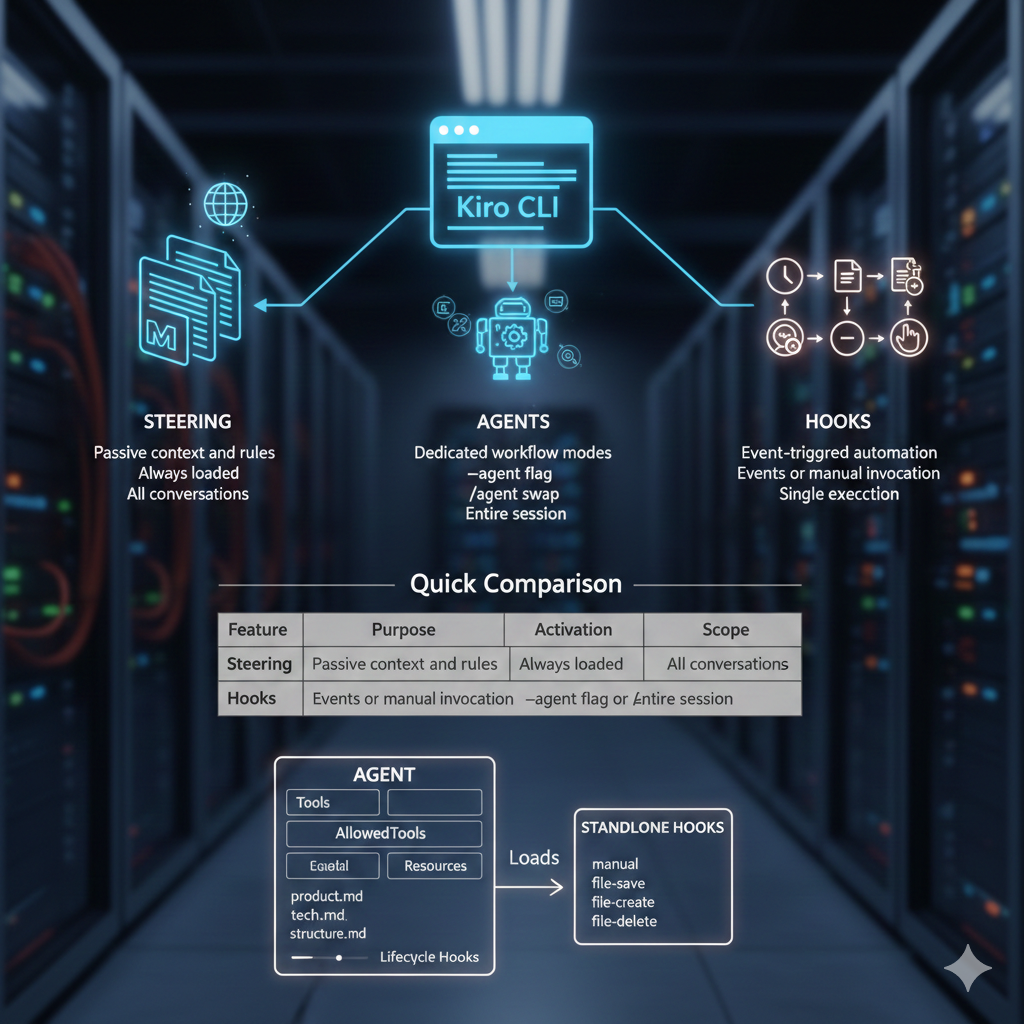
Kiro CLI has three main customization features: Steering, Agents, and Hooks. Each serves a different purpose, and knowing when to use which one will save you from building the wrong thing.
Quick Comparison
| Feature | Purpose | Activation | Scope |
|---|---|---|---|
| Steering | Passive context and rules | Always loaded | All conversations |
| Agents | Dedicated workflow modes | --agent flag or /agent swap |
Entire session |
| Hooks | Event-triggered automation | Events or manual invocation | Single execution |
How They Work Together
┌─────────────────────────────────────────────────────┐
│                     AGENT                           │
│   (Active persona with tools, permissions, context) │
│                                                     │
│  ┌───────────┐  ┌─────────────┐  ┌───────────────┐ │
│  │  Tools    │  │AllowedTools │  │   Resources   │ │
│  │(available)│  │(auto-approve)│  │   (context)   │ │
│  └───────────┘  └─────────────┘  └───────────────┘ │
│                                                     │
│  ┌───────────────────────────────────────────────┐ │
│  │            Lifecycle Hooks                     │ │
│  │ agentSpawn → preToolUse → postToolUse → stop  │ │
│  └───────────────────────────────────────────────┘ │
└─────────────────────────────────────────────────────┘
                      ↑ Loads
┌─────────────────────────────────────────────────────┐
│                    STEERING                         │
│         (Passive context, always available)         │
│   product.md | tech.md | structure.md | custom.md  │
└─────────────────────────────────────────────────────┘

┌─────────────────────────────────────────────────────┐
│               STANDALONE HOOKS                      │
│     (Event-triggered, independent of agents)        │
│   manual | file-save | file-create | file-delete   │
└─────────────────────────────────────────────────────┘
Steering: Persistent Context
Steering files are markdown files that provide passive context to every conversation. They describe your project, coding standards, tool configurations, and anything else the assistant should always know.
When to use steering:
- Team coding standards and conventions
- Project architecture and structure
- MCP server configurations and capabilities
- Authentication patterns and where credentials live
- Things you are tired of repeating in every chat
Example steering file:
# GitHub CLI Usage

The GitHub CLI (`gh`) is installed and authenticated. Use it for:
- Creating and managing PRs
- Viewing issues and comments
- Repository operations

Authentication: OAuth via `gh auth login`
Token location: Managed by gh CLI (not exposed)

Always prefer `gh` over raw API calls for GitHub operations.
Configuration locations:
- Global:
~/.kiro/steering/ - Project:
.kiro/steering/(overrides global)
Special files that auto-load when present: product.md, structure.md, tech.md
Agents: Dedicated Workflow Modes
Agents are specialized personas with their own tools, permissions, and prompts. When you switch to an agent, it takes over the session with a specific focus and set of capabilities.
When to use agents:
- Dedicated workflow modes (code review, debugging, documentation)
- Restricting which tools are available for safety
- Auto-approving specific tools to reduce prompts
- Complex multi-step workflows with specific instructions
Example agent configuration:
{
  "name": "code-reviewer",
  "description": "Reviews code for quality and security issues",
  "prompt": "You are a code reviewer. Focus on security vulnerabilities, performance issues, and maintainability. Be constructive but thorough.",
  "tools": ["read", "grep", "glob"],
  "allowedTools": ["read"]
}
Configuration locations:
- Global:
~/.kiro/agents/ - Project:
.kiro/agents/
CLI commands:
kiro-cli --agent code-reviewer- Start with agent/agent swap- Switch agents mid-session/agent list- List available agents
Hooks: Event-Triggered Automation
Hooks execute agent prompts or shell commands when specific events occur. There are two types: standalone hooks that respond to events, and lifecycle hooks embedded in agents.
Standalone Hooks
These live in the hooks folder and trigger independently of agents.
| Trigger | When It Fires | Use Case |
|---|---|---|
manual |
User invokes explicitly | On-demand workflows |
file-save |
File saved | Linting, formatting |
file-create |
File created | Scaffolding, templates |
file-delete |
File deleted | Cleanup tasks |
Example standalone hook:
{
  "name": "lint-python",
  "trigger": "file-save",
  "pattern": "**/*.py",
  "instructions": "Run ruff check on the saved file and report any issues"
}
Agent Lifecycle Hooks
These are embedded in agent configurations and run at specific points in the agent lifecycle.
| Hook | When | Use Case |
|---|---|---|
agentSpawn |
Agent initializes | Setup, environment checks |
preToolUse |
Before tool runs | Validation, can block execution |
postToolUse |
After tool completes | Logging, cleanup |
stop |
Response finished | Testing, formatting |
Configuration locations:
- Global:
~/.kiro/hooks/ - Project:
.kiro/hooks/
Decision Guide: When to Use What
| Need | Use |
|---|---|
| Persistent rules for all sessions | Steering |
| Team coding standards | Steering |
| Dedicated workflow mode (code review, debugging) | Agent |
| Restrict which tools are available | Agent |
| Auto-approve specific tools (no prompts) | Agent (allowedTools) |
| Validate or block tool execution | Agent (lifecycle hooks) |
| One-off automation task | Standalone Hook |
| React to file changes (lint on save) | Standalone Hook |
Configuration Summary
~/.kiro/                    # Global config (all projects)
├── agents/                 # Custom agents
│   └── my-agent.json
├── hooks/                  # Standalone hooks
│   └── my-hook.json
├── steering/               # Steering files
│   ├── product.md          # Auto-loads
│   ├── structure.md        # Auto-loads
│   ├── tech.md             # Auto-loads
│   └── custom.md
└── settings/
    └── mcp.json            # MCP server config

my-project/                 # Project config (overrides global)
└── .kiro/
    ├── agents/
    ├── hooks/
    ├── steering/
    └── settings/
        └── mcp.json
The Bottom Line
Start with steering. It is the simplest and covers most needs: persistent context, coding standards, and tool configurations that apply to every conversation.
Add an agent when you need a dedicated mode with specific tools and permissions, or when you want to auto-approve certain operations.
Use hooks for automation: reacting to file changes, running one-off tasks, or adding validation before tool execution.
Most projects need steering. Some benefit from agents. A few need hooks. Know the difference and you will build the right thing the first time.