
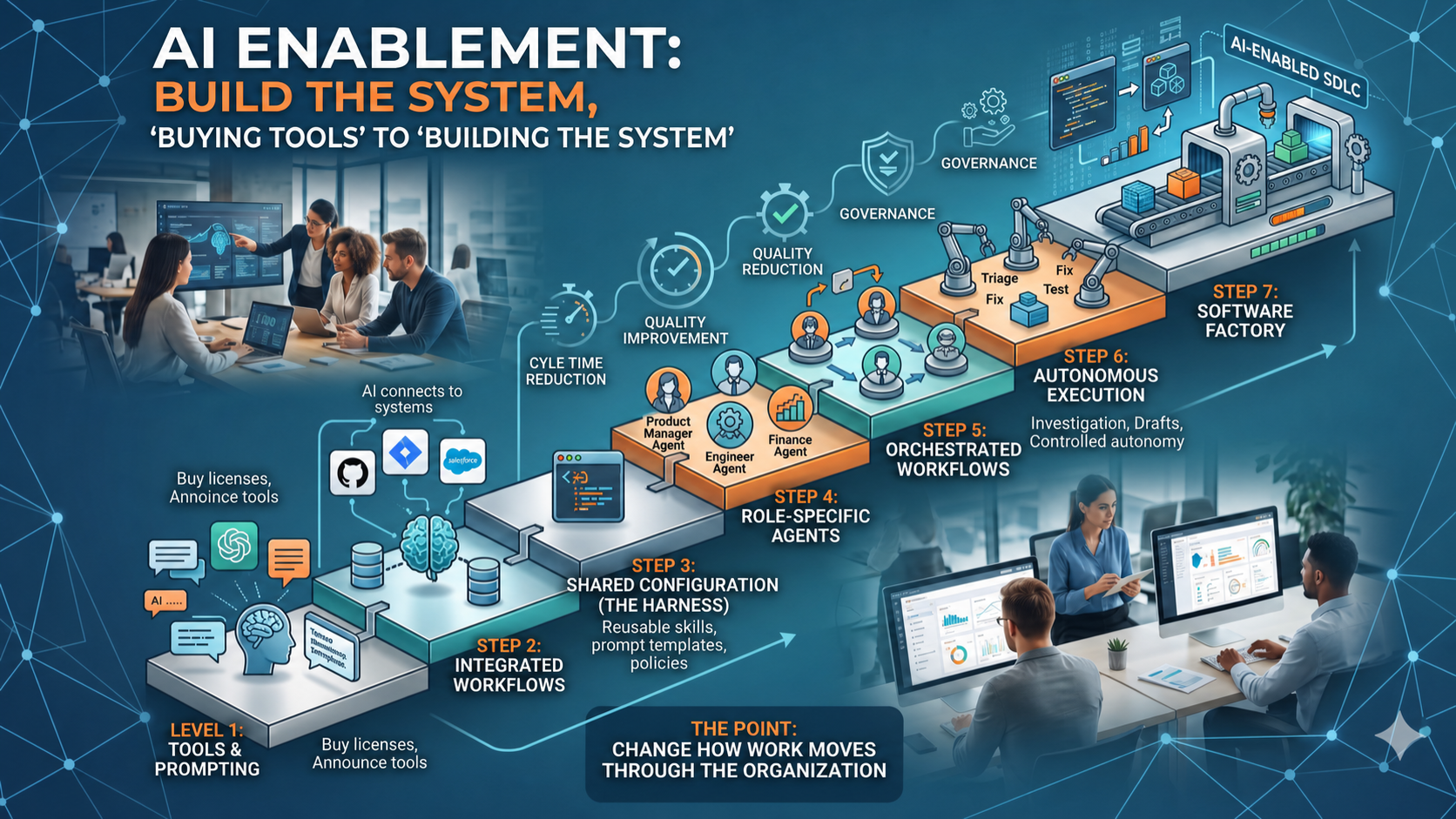
Most companies will approach AI enablement like every other enterprise rollout: buy licenses, announce tools, run training, track adoption, and hope productivity shows up. That will not be enough.
AI enablement is not about giving people access to a chatbot. It is about changing how work moves through the organization. For software teams, that becomes an AI-enabled SDLC. For the enterprise, it becomes an AI operating model. Eventually, for engineering, it becomes a software factory.
The Tool Is Not the Strategy
I expect Codex and Claude Code to keep leading for serious agentic work, especially in technical workflows. But the specific tool is not the strategy. The market will keep moving: GitHub Copilot, Cursor, Kiro, Gemini CLI, and others are all heading in the same direction.
The durable requirement is execution. Both technical and non-technical teams need local access to where their work actually happens. For engineering, that means repos, terminals, filesystems, package managers, test runners, logs, scripts, cloud CLIs, and pull requests. For business teams, it means documents, spreadsheets, systems of record, customer notes, templates, policies, queues, dashboards, and workflow tools.
Integration Is the Enablement Layer
AI becomes useful when it is connected to the systems that define, deliver, operate, and measure work: GitHub, Jira, Confluence, Azure DevOps, Salesforce, ServiceNow, observability platforms, CI/CD tools, support queues, finance systems, HR systems, reporting tools, and internal APIs.
Use the vendor CLI where it exists. Use MCP where it creates a clean bridge. Use SDKs when deeper control is needed. Use REST APIs when that is the practical path. Use SSO where possible. Use scoped permissions. Treat every credential like production access. This is not prompt engineering. This is context engineering.
Build the Harness
Most organizations will miss the harness. A harness is the reusable operating layer that defines how the organization wants AI to work: integrations, skills, role agents, prompt templates, workflow kits, policy guidance, security rules, coding standards, writing standards, review expectations, escalation paths, and examples of good output.
Most of it can be markdown. That is the point. The best enablement assets are small, versioned, reusable instructions that AI tools can load. If you do it twice, make it reusable. That turns individual prompting into organizational capability.
Create Role-Based Agents
Do not start with generic agent language. Start with roles and repeatable tasks: product, support, finance, legal, HR, security, architect, QA, DevOps, RCA analyst, code reviewer, documentation writer, and implementation planner.
These agents do not need to be complicated. They need a clear role, bounded authority, the right context, output expectations, and rules for when to stop and ask for a human.
Organize Agents Into Workflows
Individual agents are helpful, but workflows are where the operating model changes. A customer feedback workflow can ingest signals, classify themes, map them to roadmap areas, draft action, and route work. A software workflow can triage an issue, investigate root cause, design the fix, create tests, write code, review the PR, and prepare release notes.
The leverage is in the handoff. Each agent produces structured output for the next step, which makes the process clearer, more consistent, and more measurable.
Move Into Controlled Autonomy
Start with investigation: summarize cases, classify work, inspect documents, compare records, check logs, identify duplicates, draft responses, create follow-up items, and recommend next steps. Then move to controlled write paths: create tickets, prepare reports, open pull requests, update tests, generate documentation, respond to review comments, and prepare low-risk changes.
Do not start with full autonomy. Start with controlled autonomy: read, summarize, recommend, prepare, draft, validate, route, review, approve. Autonomy should be earned through evidence.
Build the Software Factory
For engineering organizations, this model eventually becomes a software factory. Not one giant agent, but a system of small, bounded, observable workflows that move work through the SDLC.
GitHub Actions is a natural backbone because it already provides triggers, schedules, repo-level execution, logs, permissions, and workflow automation. GitHub Agentic Workflows, gh-aw, is interesting because it pushes this pattern further: agentic repository workflows defined in markdown and run through GitHub Actions.
Control Surface, Execution Backbone
OpenClaw fits the same broader pattern. It can act as the conversational or control layer, while GitHub, Actions, CLIs, agents, scripts, APIs, and MCP servers do the execution underneath.
Chat becomes the control surface. GitHub becomes the system of record. Actions becomes the execution backbone. CLI, MCP, SDK, and APIs become the integration layer. Markdown becomes the shared configuration. Agents become the role-based workers. Humans remain the approval and judgment layer.
What the Workflows Look Like
A bug pipeline watches for eligible issues, triages the bug, investigates root cause, creates a plan, writes or updates tests, applies the fix, opens the PR, responds to review feedback, and asks for merge approval. A feature pipeline reads a roadmap item or customer signal, drafts requirements, creates acceptance criteria, proposes architecture, breaks work into stories, routes implementation, and tracks completion.
A test pipeline finds coverage gaps, generates test plans, creates missing tests, opens PRs, and routes review. An incident pipeline reads alerts, checks recent deployments, inspects logs, identifies likely causes, drafts the RCA, creates follow-up work, and prepares communication. That is an AI-enabled SDLC. It is not one tool, one model, or one magic prompt. It is a software factory.
How I Would Measure It
I would not measure AI enablement by license count. I would measure capability, utilization, value, and governance: approved tools, secure access, real workflow usage, cycle-time improvement, quality, cost avoidance, customer impact, audit trails, policy enforcement, and human oversight.
Usage is not the business case. Usage is a signal. The business case is cycle time, quality, capacity, cost avoidance, risk reduction, and customer impact.
The Maturity Curve
The maturity curve is simple: tools and prompting, integrated workflows, shared configuration, role-based agents, orchestrated workflows, and autonomous execution with governance and human oversight. Most organizations are still early. That is fine. The mistake is thinking the destination is better prompting.
It is not. The destination is reusable work systems.
Related Reading
This connects directly to a few earlier posts: the AI playbook for automating toil, the autonomous software factory experiment, the OpenClaw/GitHub/Slack setup, and the AI toolchain integration pattern.
The Point
AI enablement is not about buying the best tool. The best tool will keep changing. The durable advantage is the system around the tool: execution access, secure integration, shared configuration, role-specific agents, agent workflows, controlled autonomy, and a software factory.
That is where AI starts to change how work gets done. Not because it replaces human judgment, but because it removes waste from the system around human judgment.